
Hello everyone! Today’s post covers my third week in Illustrative Imaging, an online course I’m taking at Wake Tech. The prompt was to take a portrait (self or otherwise) in a kitchen while holding a colorful mug. We were also instructed to leave overhead lights on in the kitchen, in order to give the photos a yellowish cast. The objective was to perform photo corrections on the photo using Photoshop’s RAW interface.
Below is my original image (shot in RAW, per the assignment):
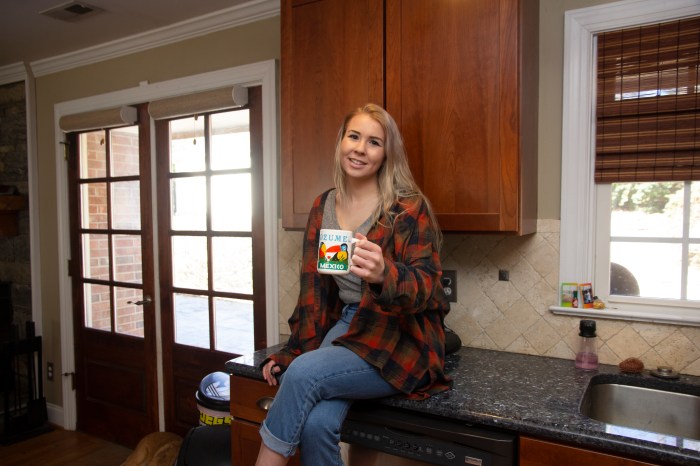
As you can see, there is a yellowish cast from the overhead lights, which needs to be fixed by changing the white balance. I also need to crop this image to frame the subject (me) better. I also need to do mild blemish correction on my skin and face. Because my lens is slightly wide angle, I will also need to use the built in lens correction feature of the RAW interface to correct the ‘bulging’ caused by lens distortion. The contrast of the photo could be changed as well to suite my preference. Finally, I will also use a few presets included in the RAW interface to make the photo more ‘flat’ and ‘matte’ which is a look I prefer in my photography.
Below is the final result of my editing using the RAW interface:

As you can see, this results in a much more pleasant photo. Below are the before and after side-by-side so you have a better understanding of the changes:


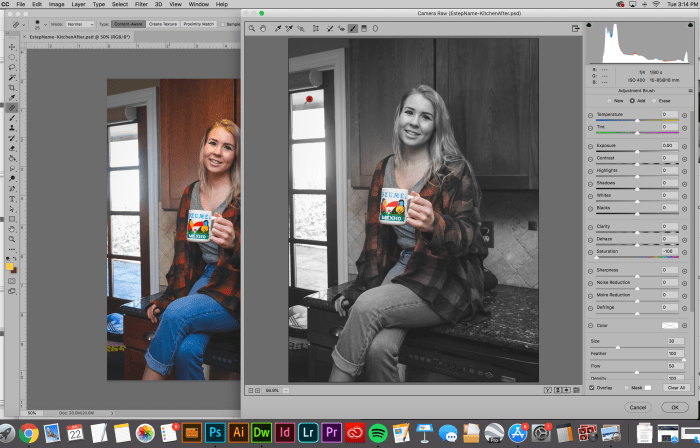
The second part of the assignment was to use the correction brush to desaturate everything in the photo except the colorful mug. Below is a screenshot of me using the correction brush to accomplish this:
The final result:

Again, I’ll include the before and after below so you can really see the difference:


Overall, this exercise was a great introduction to the Photoshop RAW interface, which is something I’d previously ignored before, opting to edit all my photos in Adobe Lightroom instead. I look forward to learning more about what editing in Adobe Photoshop’s RAW interface has to offer and hope my fellow photographers out there give it a shot as well. Cheers,
– Miranda
 Miranda Estep